Best Forex Trading Platforms for Beginners: 10 Choices
The platform is where you read a quote and place an order. The broker sets the account terms. Compare ten choices, including a learning app and chart software, by what you need to do next.
We make the apps marked "Made by our team". Some links earn us a commission. This never decides a product's place in a list. How we choose and make money.
Consider for: Trying several platforms with one broker
A large forex broker owned by StoneX Group. It has its own web platform and app, plus MT4, MT5, TradingView and NinjaTrader, so you can try different screens without changing broker.
Risk warning: CFDs are complex instruments and come with a high risk of losing money rapidly due to leverage. FOREX.com's main website shows no loss figure, so check the risk warning on its site for your country before you open an account.
More about FOREX.com
Available in
US, Canada, UK, EU (through Cyprus), Australia, Japan, Singapore and other countries
Costs
US standard plan: spreads from 1.2 pips on major pairs, no commission. RAW plan: spreads from 0.0 pips plus $7 per $100,000 traded. Overnight financing applies.
Platforms
Web, iOS and Android app, MT4, MT5, TradingView, NinjaTrader
Consider for: A simple app, plus TradingView or MT4
OANDA's own web platform and app are simple, and you can also trade your account through TradingView or MT4. Canada has a separate OANDA company with its own terms. FTMO, a Czech trading company, has owned OANDA since December 2025.
Risk warning: CFDs are complex instruments and come with a high risk of losing money rapidly due to leverage. OANDA's main website shows no loss figure, so check the risk warning on its site for your country before you open an account.
More about OANDA
Available in
US, Canada (not Alberta), UK, EU, Australia, Singapore and other countries
Costs
Spread-only plan: no commission, you pay the spread. Core plan: lower spreads plus a commission. Overnight financing on trades held past the daily cut-off.
Standard account: spread only, from about 0.8 pips on major pairs. Zero+ account: spreads from 0.0 plus a commission. Overnight financing applies.
Platforms
tastyfx web and app, MT4, MT5, TradingView, ProRealTime
Regulated by
CFTC (retail forex dealer) and NFA
Last checked
2026-10
4. Interactive Brokers
Consider for: Currency conversion alongside an international portfolio
Interactive Brokers combines international investing with currency conversion and more specialised currency permissions. Do not treat a multi-currency stock account as automatic approval for leveraged forex. Its published rules restrict Cash Forex for IBLLC accounts to Eligible Contract Participants.
Risk warning: CFDs are complex instruments and come with a high risk of losing money rapidly due to leverage. 58.9% of retail investor accounts lose money when trading CFDs with Interactive Brokers (shown on interactivebrokers.co.uk, checked 21 October 2026). The figure differs by country and changes every quarter.
More about Interactive Brokers
Available in
International investing accounts in the US, Canada, UK, EU and Australia; currency product and leverage permissions depend on the legal entity and account
Costs
Forex: 0.20 basis points of trade value (lower at very high volume), minimum $2 per order. A $10,000 trade pays the $2 minimum.
Platforms
IBKR Mobile, IBKR Desktop, Trader Workstation, web
Regulated by
US: SEC, FINRA, CFTC and NFA. Canada: CIRO. UK: FCA. EU: Central Bank of Ireland. Australia: ASIC.
Last checked
2026-10-21
5. Charles Schwab (thinkorswim)
Consider for: US investors who already use Schwab
Schwab offers forex on its thinkorswim platform, next to stocks, options and futures. You must apply for forex trading and be approved. It is not offered to residents of Ohio or Arizona.
No commission. You pay the spread; it advertises an average of 1.2 pips on EUR/USD. Overnight financing applies.
Platforms
WebTrader, iOS and Android app, MT5
Regulated by
CFTC (retail forex dealer) and NFA
Last checked
2026-10
7. TradingView
Consider for: Charts and practice trades on any device
A charting platform, not a broker. Paper trading is free for all users. You can link accounts at supported brokers, such as OANDA, FOREX.com and tastyfx, and trade from the charts.
Free plan. Paid plans add more features. Trading costs come from the broker you link.
Platforms
iOS, Android, web, desktop
Account type
Not a broker. Real trades go through the broker you link, which is the regulated company.
Last checked
2026-10
Earlier TradingView app screens. Prices and headlines are historical. The first panel credits Jimmy Chin for the photograph.
8. MetaTrader 5
Consider for: Learning software that many brokers offer
Free trading software from MetaQuotes. It is not a broker: you log in with an account from a broker that offers MT5, such as FOREX.com, tastyfx or Trading.com.
Free software. Trading costs depend on your broker.
Platforms
Desktop, web, iOS, Android
Account type
Not a broker. The broker behind your MT5 login is the regulated company.
Last checked
2026-10
9. eToro
Consider for: Exploring copy trading where currency CFDs are available
eToro combines a virtual portfolio with CopyTrader. Its currency product is a CFD in eligible countries, including the UK and Australia. The US service has no forex CFDs, and Canadian residents cannot open accounts.
Risk warning: CFDs are complex instruments and come with a high risk of losing money rapidly due to leverage. 55% of retail investor accounts lose money when trading CFDs with eToro (shown on etoro.com, checked 21 October 2026). The figure differs by country and changes every quarter. Copied trades can lose money too.
More about eToro
Available in
UK and Australia; EU access subject to local restrictions; US investing service without forex CFDs; unavailable in Canada
Costs
For forex CFDs, check the itemised opening/closing charge, market spread and overnight financing. No separate copying fee. USD investment-account withdrawals cost $5; conversion and local account terms vary.
Platforms
eToro app (iOS, Android), web
Regulated by
UK: FCA. EU: CySEC. Australia: ASIC. US: SEC and FINRA for stocks.
Last checked
2026-10-21
10. GoForex
Made by our team
Learning and practice: Understanding currency pairs before choosing a broker
GoForex pairs short forex lessons with virtual trading. Use it to connect a quote, a position size and a price move before you learn a broker’s order screen.
iOS and Android; check availability in your local store
Costs
Free download with optional in-app purchases; check local prices, feature access and renewal terms.
Platforms
iPhone, Android
Account type
Not a broker: it uses virtual money only and holds no client money
Last checked
2026-10-21
Which kind of platform do you need?
If you need to understand a currency quote, start with GoForex’s lessons and virtual practice. To study a chart, try TradingView . To learn a particular ’s Buy, Sell and stop controls, open its demo.
For US retail forex, the list includes FOREX.com, OANDA, tastyfx, Schwab thinkorswim and Trading.com. Schwab requires forex approval and excludes Ohio and Arizona. Interactive Brokers is a specialist case: currency conversion is different from leveraged forex permission.
eToro is relevant if you want to explore copying and currency CFDs in eligible countries such as the UK and Australia. Its US investing account does not provide forex CFDs, and it is unavailable in Canada.
MetaTrader 5 and TradingView are software, so you must separately choose an eligible broker for live trading. Platform and account availability vary by regional company. Our forex broker comparison focuses on that company and country decision.
What does one trade cost on a platform?
Every forex price has two sides. The is the price you can sell at. The is the price you can buy at. The ask is always a little higher. The gap is called the .
The spread is a cost you pay the moment you trade. If you buy and sell straight away, you lose the spread, even if the price did not move.
Most brokers in this list offer a plan with no . On those plans, the spread is your main cost. Interactive Brokers works the other way: it charges a small commission and says it adds no markup to the spread.
Spreads also change. They are often wider when markets are quiet, such as late at night, and around big news. A broker's "from 0.8 pips" means the best case, not every trade.
Try it below: buy, then sell straight away, and see what it costs.
Try it yourself
Buy, then sell straight away
Press Buy, then Sell now, without waiting for the price to move. Then slide the number of trades per month.
EUR/USD shows 1.10000 to sell and 1.10012 to buy, a 1.2-pip spread. Buying 10,000 euros and selling right away loses $1.20. At 20 trades a month, that is $24 before any commission or overnight fees.
What would you expect?
What this shows: You lose the spread the moment you trade: $1.20 on 10,000 euros of EUR/USD, or $24 a month at 20 trades.
The buy price is always a little higher than the sell price. That gap is the main cost on most no-commission platforms, and you pay it on every trade, win or lose.
How do I compare the full cost of a trade?
Don't compare spreads alone. Add up everything for the same trade at each broker: the spread, any commission and any overnight fee.
Example: the tighter spread costs more
You trade 10,000 euros of EUR/USD. Each pip is worth $1.
Platform A: 1.2-pip spread, no commission. Total: $1.20.
Platform B: 0.2-pip spread plus $1.40 commission for buying and selling. Total: $1.60.
These are made-up numbers to show the maths, not prices from the brokers in this list.
Then look for the costs that don't show on the order screen:
Minimum fees: Interactive Brokers charges at least $2 per forex order. On a small trade, the minimum is bigger than the tiny rate.
Overnight financing: you pay it (or sometimes get it) each night a trade stays open.
Conversion and account fees: for example, fees to change currency, to withdraw or for not trading.
Write the date next to every price you find. Costs change, and an old screenshot is not a quote.
What should US beginners check?
In the US, a forex broker must be registered with the CFTC and be a member of the NFA. Look up any firm on NFA BASIC. It shows the firm's registration and any past fines.
Even big brokers have paid NFA fines. Since 2022 the NFA has fined these US companies:
OANDA: $600,000 in 2025, partly for having too little capital
FOREX.com: $700,000 in 2022, after a platform fault and changes to customer accounts
Interactive Brokers: $250,000 in 2022, for cancelling some customers' forex trades
Trading.com: $50,000 in 2024, for late financial reports
A fine is not a ban, but read what it was for and when.
Three more US rules to know:
Leverage is capped at 50:1 on major pairs and 20:1 on other pairs.
US beginners can't trade forex CFDs. You trade real currency pairs, or currency futures.
SIPC, which protects stock accounts if a broker fails, does not cover forex accounts.
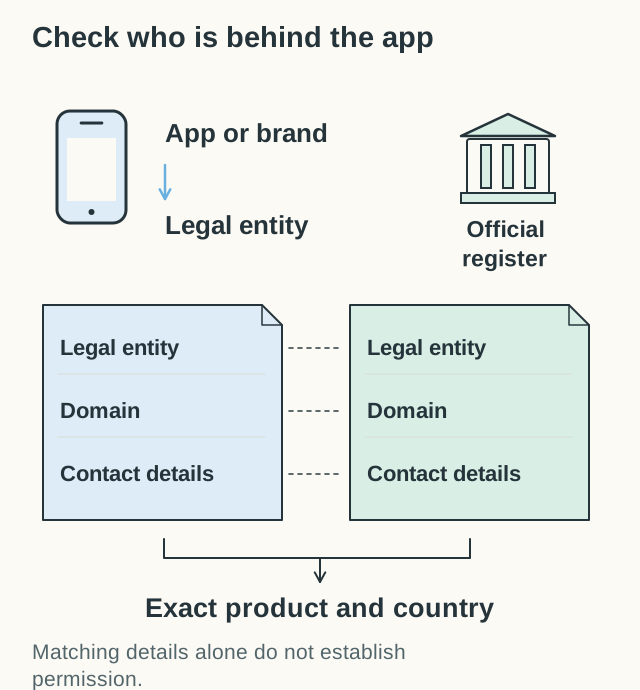
Use the app’s brand only to find the actual account company. Check its exact product and country through an independent official register, then match the website and contacts.
Where can I get a second opinion?
Four free research sites can also help. They are not platforms, and they never hold your money. Use them to find questions and other names, then check the facts on the broker's own site and your regulator's register.
ForexBrokers.com has detailed broker reviews, including a guide for US traders.
Investopedia explains words like , spread and leverage.
NerdWallet writes plain-English money guides and broker comparisons, mostly for US readers.
Benzinga publishes short lists of US forex brokers.
Like many comparison sites, including this one, they may earn money from some links. Read each site's method, its date and which country it covers. A score from another site shows that site's view. It is not a test we did.
How do I test a platform in a demo?
The broker platforms here offer demo or paper practice, subject to account and country eligibility. Use it to test the parts that matter when something goes wrong, not just the nice charts.
Check that you are in demo mode. Find the pair and its trade size.
Before you press Buy, explain the difference between the full trade size and the margin it uses.
Place a small practice order with a stop-loss. Then find it in your open orders and in your history.
Cancel an order. Check whether part of it filled before the cancel.
Read what to do if the app loses its connection. Always check your history before you send the order again.
Find the fee page, the support contact and the account agreement.
If a step confuses you, write it down. That platform may not be the right first choice. Our lesson on market, limit and stop orders explains the order types you will see.
How we chose
We compared forex broker platforms, trading software and practice apps using public information and each provider's official pages: what it offers, where you can open an account, what it costs, what account and security information it publishes, and what users report. Only then do we check whether an affiliate programme exists. We do not accept payment for placement. Each card shows when we last checked its details; we rechecked the changes on this page on 21 October 2026.
Broker platforms come first, then charting and trading software, then eToro's social investing app and our GoForex practice app. Within each group the order is not a ranking. We did not open accounts or test order execution, withdrawals, uptime, support or security. We make the apps marked “Made by our team”. Our About page explains how we choose recommendations.
Questions beginners ask
What is the easiest forex platform for beginners?
There is no single easiest one. A broker's own app is often simpler than MetaTrader 5, which has many tools. Try two platforms in demo mode and keep the one where you can find costs, orders and history fastest.
Is MetaTrader 5 a broker?
No. MetaTrader 5 is free software from MetaQuotes. You log in with an account at a broker that offers it. That broker holds your money, sets your costs and is the company your regulator checks.
Can I trade forex on TradingView?
Yes, if you link an account at a supported broker, such as OANDA, FOREX.com or tastyfx. Without a broker, you can still use TradingView's free paper trading with pretend money.
Which of these brokers are regulated in the US?
FOREX.com, OANDA, tastyfx, Interactive Brokers, Charles Schwab Futures and Forex, and Trading.com appear in US regulatory records. Check the exact company on NFA BASIC. Registration alone does not give you every product permission: Interactive Brokers has additional eligibility restrictions for leveraged Cash Forex.
Do forex platforms charge a monthly fee?
Most broker platforms are free to use. TradingView has paid plans for extra features. You pay for trading through the spread, commissions and overnight fees. Some brokers also charge for inactivity or withdrawals.
Ten forex apps compared: eToro first for a demo with real shares and currency CFDs, GoForex for lessons, then TradingView, FOREX.com, OANDA and Trading Game.