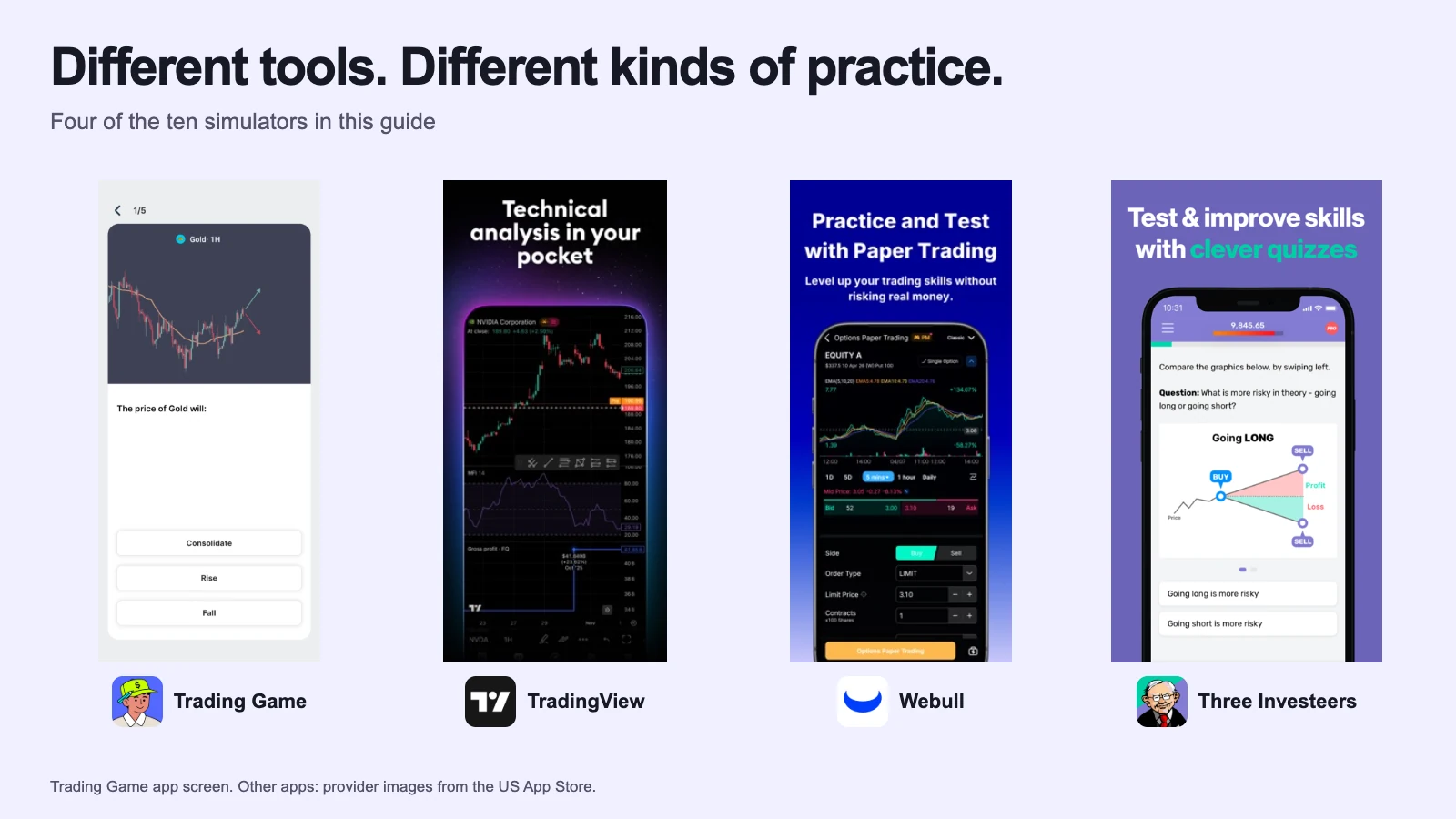
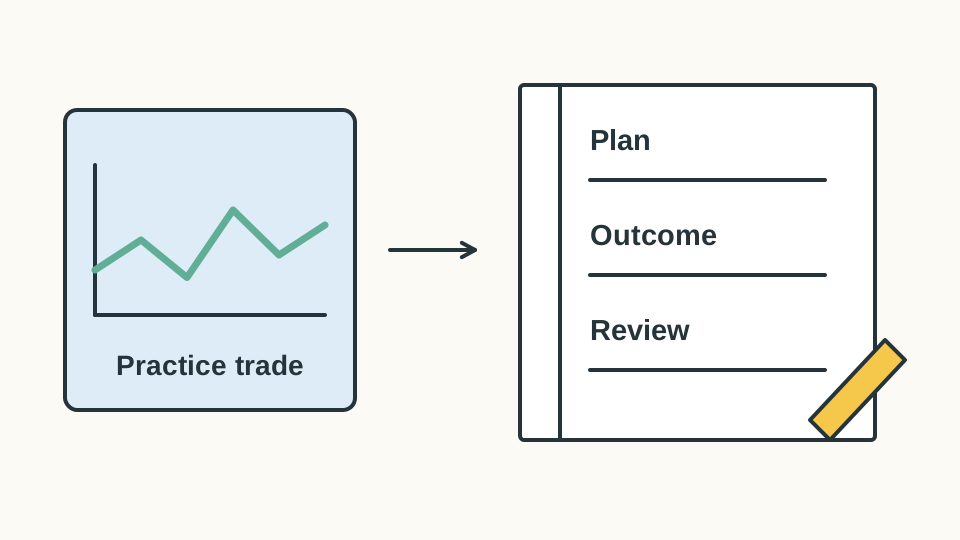
Ten simulators, three jobs: learning to trade, rehearsing a broker, running a class. Here is which one does which, with the facts from each product's own pages, and a plain account of the one we make.
Best for: Learning to trade on a phone, with a coach
Choose Trading Game if you are starting from zero and you want someone to show you the trade, read the chart with you and tell you how you did. It is ours, so check the facts table rather than taking my word for it.
A 16-chapter academy, two analyst setups a day you can copy onto your chart, an AI that reads the chart with you, and a coach that reviews the trade you just closed. Live prices on 220-plus assets, ten timeframes, a short indicator list with volume on it, ten-minute battles and a weekly leaderboard. You pick the balance, from $500.
Good
Live prices, ten timeframes and the AI chart read, free
Two analyst setups a day, drawn on the chart; Copy to Chart puts them on yours
A coach that reviews the closed trade, with a free weekly allowance
A balance you choose, from $500 or even $200, so a loss means something
Ten-minute battles against a friend, the AI or a stranger; a daily pattern drill
Watch out
No limit orders, options or futures; the ticket is market entry with a stop and a target
No web version yet (listed as coming soon); the full coach, advanced courses and book library are Pro
Available in
100-plus countries, including the US, Canada, UK and Australia. Six languages. A learning simulator, not a brokerage account.
Costs
Free: simulator, live prices, chart tools, AI chart read, fundamental courses, two Copy to Chart uses, a weekly coach allowance, battles and games. Pro: $19.99 a month, or $89 a year shown at $54 on the current offer (checked 24 October 2026); adds the full coach, unlimited Copy to Chart, advanced courses, the book library and no ads.
Platforms
iPhone and Android; the current pricing page lists web as coming soon
Account type
Educational simulation; no real-money brokerage service.
Last checked
2026-10-23
Ours, so judge it on the facts. The simulator, the live prices, the AI chart read, the fundamental courses, the daily analyst setups (two copies), the coach (a weekly allowance), battles, the daily pattern game and one book summary a month are all free. Pro buys the rest: the full coach, unlimited Copy to Chart, the advanced courses, the book library, no ads. Start free, and start with a $500 balance; the small number is the lesson.
2. TradingView Paper Trading
Best for: Charts, and a paper ticket you can later connect to a broker
Choose TradingView when you already have a question to test on a chart. Everything is there, from 400 indicators to Pine Script; nothing tells you where to start.
The best chart there is, with a paper-trading account behind the Trade button: market, limit, stop, bracket exits, commission and leverage settings, Replay on historical data. Free for everyone, with one chart per tab and two indicators until you pay.
Good
400+ indicators, 110+ drawing tools, community scripts
A broker-grade paper ticket, and a real broker connection when you are ready
Live crypto, forex and Cboe US stock prices on the free plan
The Leap: free tournaments with cash prizes
Watch out
Two indicators per chart and ads on the free plan
NASDAQ and NYSE primary feeds cost extra, on a paid plan only
No lessons, no feedback, no good-till-cancelled order
Available in
Worldwide; TradingView says Paper Trading is open to all users.
Costs
Paper trading is free. Paid plans from $12.95 a month billed yearly; live primary-exchange data is a separate add-on.
Platforms
Web, desktop app, iPhone, Android
Regulated by
Not needed for paper trading
Last checked
2026-10-23
Choose TradingView when you have a plan to test. Paper Trading sits behind the Trade button in the broker panel, with a full ticket: market, limit, stop, bracket exits, commission and leverage settings, no good-till-cancelled. On the free plan you get one chart per tab, two indicators and live prices on crypto, forex and Cboe US stocks; a paid plan buys more charts, and live primary-exchange data is a separate add-on. Nothing in it tells you what to do. That is the deal.
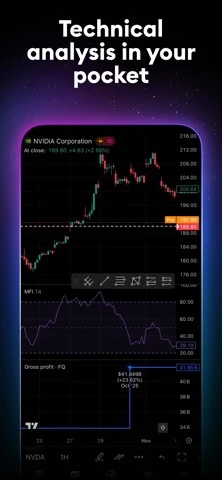
TradingView stacks the price chart, drawing tools and indicator panels in one mobile workspace.Earlier TradingView app screens. Prices and headlines are historical. The first panel credits Jimmy Chin for the photograph.
3. Webull paperTrade
Best for: Rehearsing the Webull ticket before you fund the account
Choose Webull if you have, or will open, a Webull account. Practise the ticket you will actually use, including the boring parts: order status, cancelling, history.
Webull's live app with pretend money: the full ticket, multi-leg options, futures, simulated margin calls, and a tap to switch to real funds. Two systems, a new one on mobile and desktop and a legacy one that also runs on the web.
Good
The real broker ticket, including options and futures, at no cost
"Unlimited" virtual funds, reset or reload any time
One tap from practice to a funded account
Watch out
Options quotes delayed 15 minutes unless you pay for OPRA on a real account
New and legacy systems differ; the legacy import is one way
paperTrade pages for the US, Canada, Australia and Singapore only; nothing teaches
Available in
US, Canada, Australia and Singapore have paperTrade pages; what you can trade differs by country.
Costs
Free. Webull sells data packages and Premium around the real account.
Platforms
iPhone, Android, desktop, web
Regulated by
Practice mode uses simulated orders. For funded access, check the local Webull legal entity and regulator.
Last checked
2026-10-23
Webull makes sense when you want to learn Webull. paperTrade is the live app with pretend money: the full ticket, multi-leg options, futures, margin calls simulated, and a one-tap switch to real funds. The US FAQ describes two systems, a new one on mobile and desktop and a legacy one that also runs on the web; the import from legacy is one way, so save your record first. Options quotes are delayed 15 minutes unless you pay for OPRA on a real account.
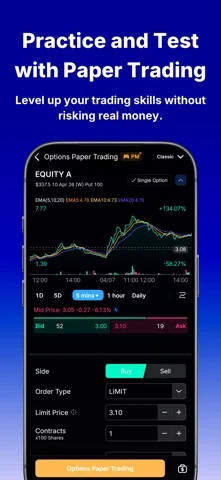
Webull’s paper-options ticket shows bid and ask prices above the buy/sell, limit-price and contract controls.
4. thinkorswim paperMoney (Charles Schwab)
Best for: Learning the thinkorswim ticket before a live Schwab account
Choose paperMoney if thinkorswim is where you will trade. The ticket is deep and the analysis tools are serious; a non-client gets 30 days to learn them, so plan the exercises first.
More about thinkorswim paperMoney (Charles Schwab)
Schwab's paperMoney provides $100,000 of virtual buying power within thinkorswim, with equity, options, futures and forex simulation.
Good
The full thinkorswim ticket on desktop, web and phone
Equities, options, futures and forex simulated with $100,000 of buying power
Watch out
Non-clients get a 30-day Guest Pass that cannot be extended
Guest Pass settings and data do not carry into a live account; nothing teaches
Available in
US. Schwab clients, or US residents with a 30-day guest pass.
Costs
Free for Schwab clients. Non-clients can try it with the 30-day guest pass.
Platforms
Desktop, web, iPhone, Android
Regulated by
SEC and FINRA (US)
Last checked
2026-10-23
Choose paperMoney to learn the thinkorswim ticket, especially if that is where you will trade. For a non-client the catch is the clock: Schwab's Guest Pass FAQ says the 30-day pass cannot be extended and its settings do not carry over. Plan a few order exercises and keep your own notes, or the trial ends just as the menus start making sense.
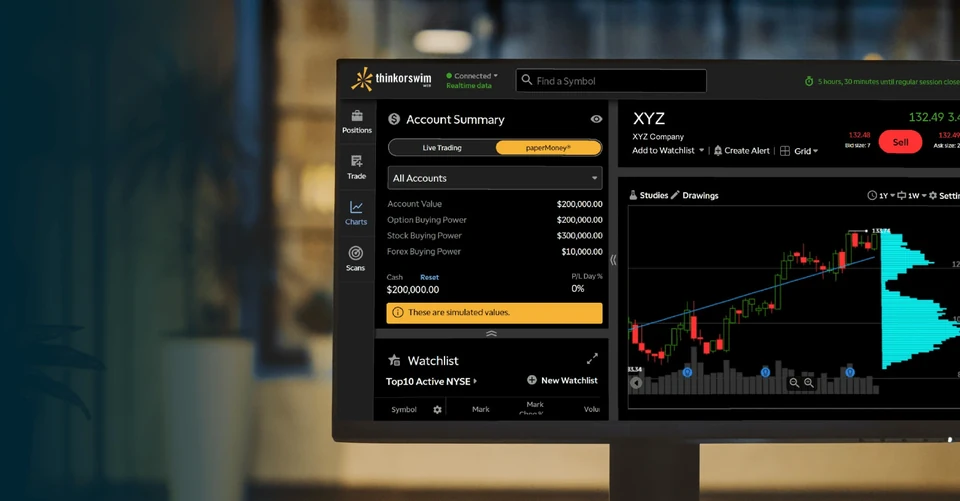
thinkorswim’s paperMoney tab sits beside Live Trading, with simulated balances alongside the chart.
5. eToro Virtual Portfolio
Best for: Learning the eToro interface before you fund it
Choose eToro's virtual portfolio for one reason: you intend to use eToro. Find the switch into virtual mode first; it is the control people struggle to locate.
Risk warning: outside the US, eToro also offers CFDs with real money. CFDs are complex instruments and come with a high risk of losing money rapidly due to leverage. 51% of retail investor accounts lose money when trading CFDs with eToro (shown on etoro.com, checked 21 October 2026). The figure can differ by country and change over time; check the warning for your local eToro entity.
More about eToro Virtual Portfolio
A $100,000 virtual portfolio that switches between practice and real views inside the eToro app. What you can practise depends on your local eToro entity.
Good
Practise the eToro interface with no deposit
Real shares and ETFs as well as CFDs, where your entity offers them
Watch out
eToro's own US pages disagree about which states and territories can use it
Nothing teaches; eToro Academy is a separate site
Available in
US access varies by state and territory and eToro's own pages disagree; elsewhere it depends on the local eToro entity. Confirm in your account.
Costs
Virtual Portfolio is free. Funded-account charges depend on the eToro entity and product; US and international fee schedules differ.
Platforms
Web, iPhone, Android
Regulated by
For US securities: eToro USA Securities Inc., SEC registered and FINRA/SIPC member. Other regions use different legal entities.
Last checked
2026-10-23
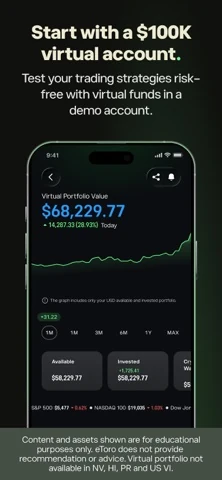
The one reason to use it is to learn eToro before funding it. The switch into virtual mode is the first thing to find. Access depends on where you are: the US live-states page and the US store listing disagree about four states or territories, and what you can trade depends on your local eToro entity. Nothing in it teaches; eToro Academy is a separate site.
eToro’s Virtual Portfolio separates available cash from invested funds beneath the account-value chart.
6. MarketWatch Virtual Stock Exchange
Best for: A quick game for a class or a group of friends
Choose MarketWatch for a group that wants to compete under shared rules without installing anything. The organiser sets the budget, the symbols and the permissions; the leaderboard does the rest.
A browser game in which an organiser sets a virtual budget, eligible symbols and trading rules for a group.
Good
Organiser sets the budget, the symbol list and the rules
Optional limit and stop orders and partial shares
Watch out
Age 16 and over, with a MarketWatch login
A leaderboard and nothing else: no lessons, no feedback, prices not stated
Available in
Browser access, subject to sign-up terms. MarketWatch specifies users aged 16 and older.
Costs
Free with a MarketWatch login.
Platforms
Web
Regulated by
Not needed: only virtual money is used
Last checked
2026-10-23
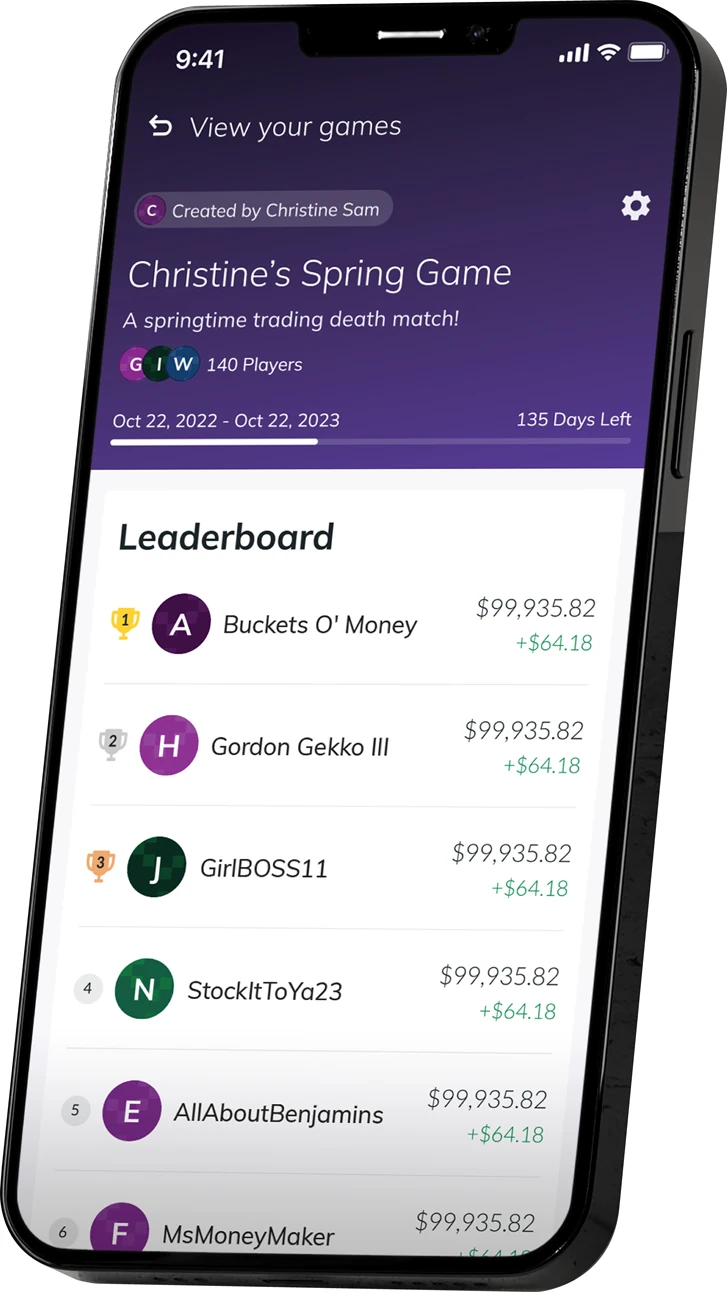
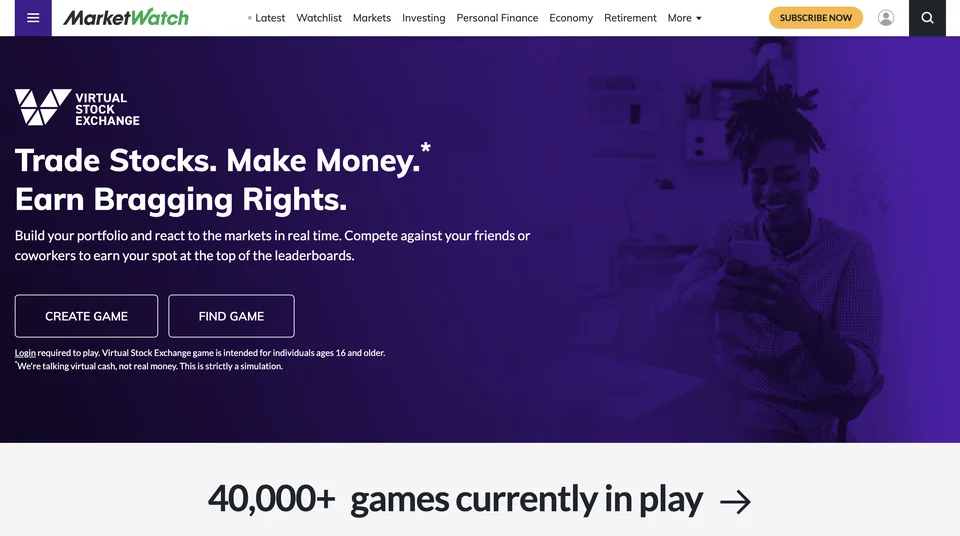
Use it for a group that wants to argue under the same rules. The game settings let an organiser set the budget, the symbol list and permissions such as shorting and partial shares. Set them together before anyone trades. A leaderboard gets interesting when the leader has to explain the position rather than point at a green number.
MarketWatch’s leaderboard ranks players by portfolio value. Shown: a 2022–2023 game.Earlier MarketWatch Virtual Stock Exchange page. The pictured money refers to the simulation.
7. Investopedia Simulator
Best for: A free, slow portfolio of US stocks, or a class game
Choose Investopedia for a portfolio you will hold and discuss over months, or a game for a class. Its own help centre rules it out for chart practice: the delay is deliberate and permanent.
6,000-plus US stocks and ETFs, options to buy, short selling, a ticket with limit and stop orders, and public or private games with your own rules. Quotes are about 20 minutes old and orders fill about 20 minutes after you place them.
Good
Market, limit and stop orders with day or good-till-cancelled duration
Free games with custom cash, commissions and rules, no player limit
No paid tier
Watch out
Quotes about 20 minutes old; fills about 20 minutes late; $19.95 pretend commission by default
No app; the website works in a phone browser
Nothing reviews a trade
Available in
Anyone can register, Canadians included; stock practice is US-dollar NYSE and Nasdaq listings only.
Costs
Free; Investopedia says no deposit or financial information is needed.
Platforms
Web browser
Regulated by
Not needed: only virtual money is used
Last checked
2026-10-23
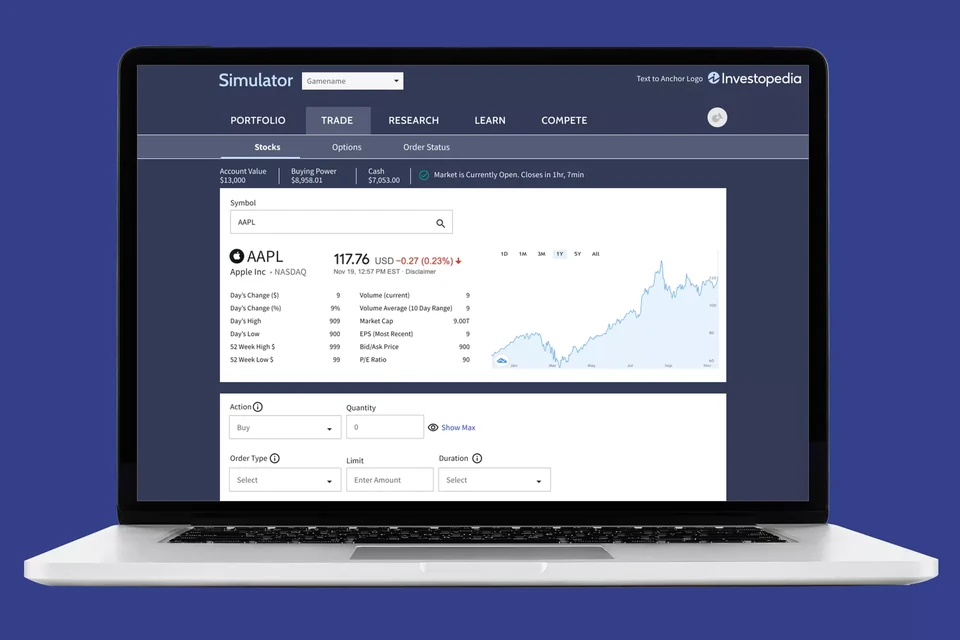
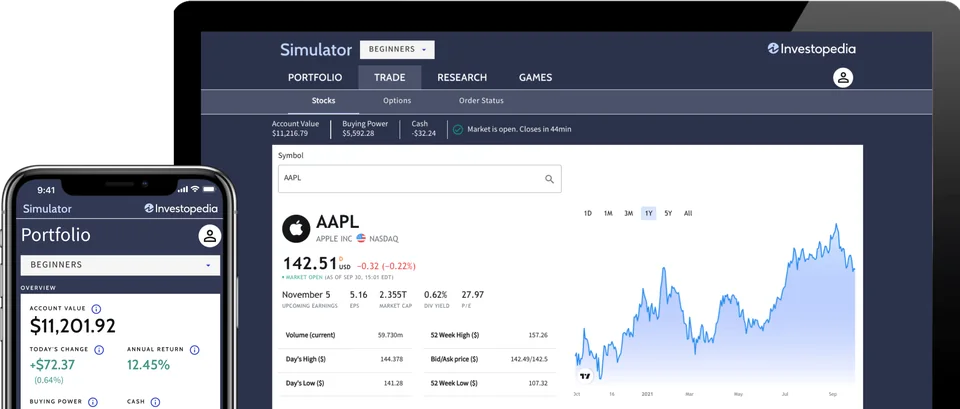
Use Investopedia for a portfolio you will hold and discuss over months. Six thousand US stocks, limit and stop orders, options to buy, short selling, free games with your own rules, no paid tier. The documented delay rules it out for chart practice: quotes about 20 minutes old, fills about 20 minutes later, and a $19.95 pretend commission unless a game owner lowers it. No app; the site works in a phone browser.
Investopedia’s stock ticket puts quantity, order type, limit price and duration below the quote.Earlier Investopedia Simulator screens with example account balances.
8. HowTheMarketWorks
Best for: Running a class
Choose HowTheMarketWorks if you teach. Nothing else here gives an instructor the controls; for a solo learner it is a brokerage ticket with a delayed screen and a leaderboard.
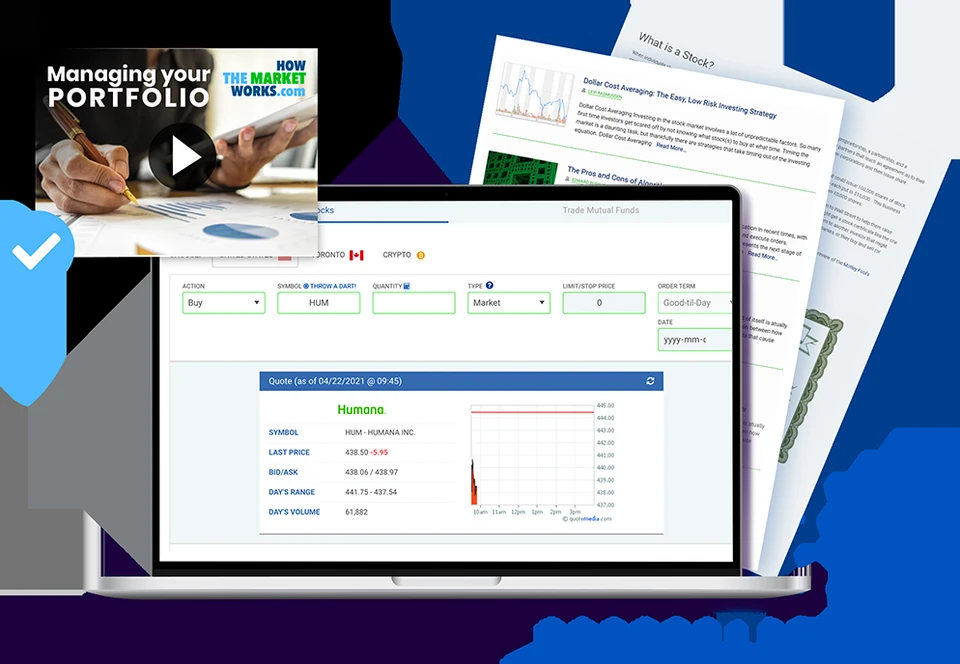
A teacher sets the cash, commissions, dates and rules, assigns lessons, reads students' trade notes and hands out certificates. Fifty built-in lessons. Orders fill at live prices; the quote on screen is 15 minutes old. Free, with ads.
Good
Unlimited private contests with your own rules, free
Assignments, trade notes, certificates, privacy handling for minors
Limit, stop and trailing-stop orders, short selling, optional margin
Watch out
Prices on screen 15 minutes old; US market hours only
No app; nothing reviews a trade
Some help pages date from 2015 and 2016
Available in
Browser-based classroom service; confirm local registration and school requirements.
Costs
Free and advertising-supported.
Platforms
Web browser
Regulated by
Educational simulation; trades use virtual money.
Last checked
2026-10-23
The feature to choose it for is the trade note. The teacher's guide describes notes and reports that let an instructor see why a student opened a position, which is the difference between a stock-picking contest and a lesson. Set the budget, permissions and commissions before assigning anything, and tell the class that the quote on screen is 15 minutes old while fills are live. Free, no app, built for minors' privacy.
HowTheMarketWorks groups the symbol, quantity, order type and expiry above the quote. Shown: a 2021 example.
9. Wall Street Survivor
Best for: A free browser contest with prizes and courses
Choose Wall Street Survivor for a web contest with a fuller ticket and a shot at a prize, or just for the course catalogue. It ranks you; it does not tell you why.
A $100,000 portfolio contest with limit and stop orders, options and short selling where the contest allows, 36 free short courses, monthly prizes for US and Canadian adults outside Quebec, and an AI allocation wizard. The quote on screen is 15 to 20 minutes old; fills use the live bid and ask.
Good
Limit and stop orders, options and short selling by contest rules
36 free courses in four groups, browsable without trading
Monthly prize contests and unlimited private ones
Watch out
Quotes 15 to 20 minutes old while fills are live
Prizes only for US and Canadian adults outside Quebec; no app
Newsletter adverts on the pages and in the dashboard; nothing reviews a trade
Available in
Provider advertises desktop and mobile access; check current registration and contest terms.
Costs
Official site advertises free access without a credit card or subscription.
Platforms
Desktop and mobile browser access
Regulated by
Educational simulation; virtual trades are not funded investments.
Last checked
2026-10-23
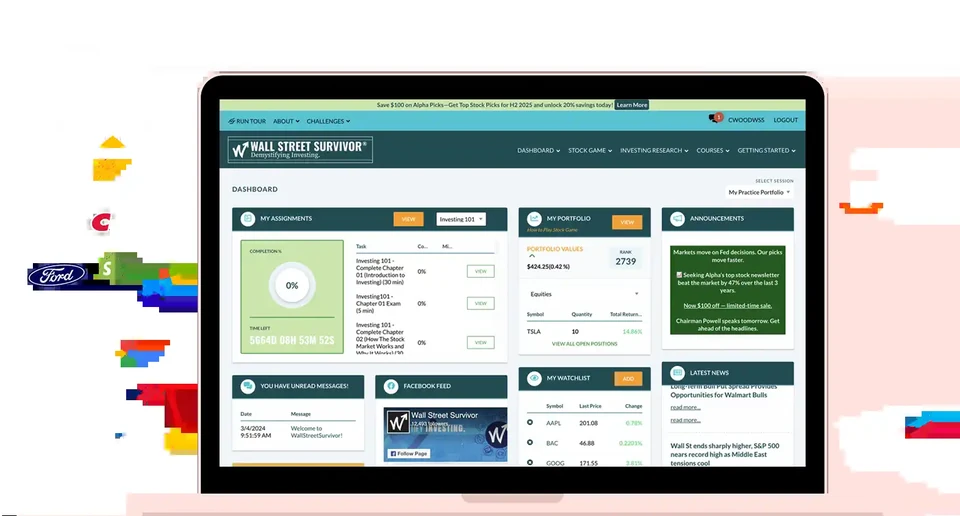
Decide what the contest rewards before you join. The rules make costs, shorting and margin depend on the contest, and prizes need adult residency in the US or Canada outside Quebec. The 36 free courses are worth browsing even if you practise elsewhere. The quote on screen is 15 to 20 minutes old whatever the banner says, and the dashboard carries newsletter adverts. A web contest with courses nearby, not a phone coach.
Wall Street Survivor brings assignments, portfolio holdings, rank and a watchlist onto one dashboard.
10. Three Investeers
Best for: The closest thing to Trading Game, with a web app today
Choose Three Investeers if you need a browser now or want a long indicator menu, and you can teach yourself. Try the free lessons and see whether the style suits you; then read its own small print on leverage.
A $100,000 virtual portfolio with live prices on 200-plus securities, fixed stakes of $100 to $5,000, leverage to 100x, a Trading School with free basics and PRO for the rest, a weekly leaderboard and a Pattern Sniper quiz. No volume on the chart, no analyst setups, no AI read, no coach.
Good
iPhone, Android and a web app
Live prices and sixty-plus indicators
Cheaper PRO on the monthly, yearly and lifetime plans
Watch out
100x leverage, and its own page says a losing position is never force-closed
Nothing reviews a trade; no analyst setups; no volume indicator
Several PRO prices in the store catalogue; check the one you are offered
Available in
Not stated by the developer; available in the app stores and on the web.
Costs
Free with ads. PRO from $1.99 a week per the listing text; $12.99 a month; yearly plans from $19.99; lifetime $99.99.
Platforms
iPhone, Android, web
Regulated by
Educational simulation; virtual funds are not a brokerage deposit.
Last checked
2026-10-23
The nearest thing to Trading Game on this list, and worth trying if you need a web app today or want a long indicator menu. Live prices, a similar market list, a Trading School with free basics and PRO for the rest, a weekly leaderboard with occasional prizes. Two things from its own comparison page: leverage goes to 100x, and a losing leveraged position is never force-closed. There is no volume on the chart, no analyst setups, no AI read and no coach. The head-to-head is here.
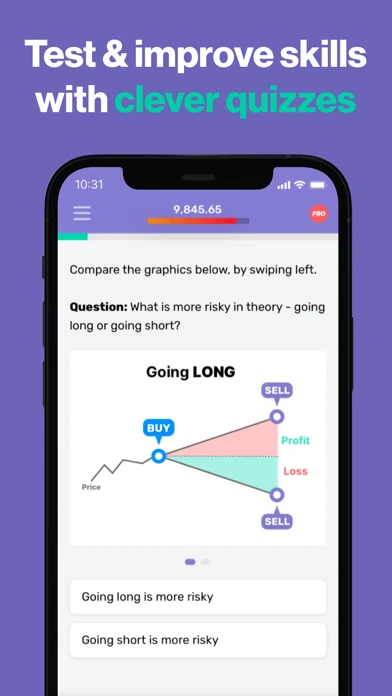
Three Investeers asks you to compare long and short positions, then choose which carries more risk.
Learning to trade on a phone: Trading Game, with analyst setups, an AI chart read and a coach after each trade.
The short answer
Ten simulators, three jobs. If you want to learn to trade and you have a phone, start with Trading Game. If you want to rehearse a broker, use that broker's own practice mode: Webull or thinkorswim, and TradingView if you want the best chart and a ticket you can later connect to a broker. If you want to run a class, it is HowTheMarketWorks, and nothing else on the list is close.
The rest, Investopedia, Wall Street Survivor, MarketWatch and eToro's virtual portfolio, are portfolio games: a pretend $100,000, a list of US stocks, a leaderboard, and a quote that is often fifteen or twenty minutes old. They are fine for holding ten shares for a term. They will not teach you to read a live chart, and none of them reviews a trade.
Ownership first: Trading Game is made by the company behind this site, which is why it gets its own section below and six head-to-head pages. The facts in the tables come from each product's own pages; for Trading Game, from the app itself, since we make it.
Two tables: what the money and prices look like, and what you actually get. Every cell was checked against the product's own pages on 23 October 2026. "Not stated" means the company does not say.
Money, prices and cost (checked 23 October 2026)
Simulator
Starting money
Prices
Cost
Where
Trading Game
You choose: $500 to $10,000, and $200 is offered
Real time, several updates a second
Free with ads; Pro $19.99 a month or $54 a year (current offer)
100+ countries
Investopedia Simulator
$100,000 in the default game (per reviews); game owners set the amount
Delayed about 20 minutes; orders about 20 minutes later
Free, no paid tier
US hours, US dollars; anyone can join
TradingView Paper Trading
No stated default; $100,000 in competitions; reset to any balance
US stocks (Cboe), crypto and forex real time on the free plan; other exchanges delayed
Free; paid plans from $12.95 a month
Worldwide
Webull paperTrade
"Unlimited"; $1,000,000 shown
Stocks real time; options quotes delayed 15 minutes unless you pay for OPRA
Free
US, Canada, Australia, Singapore
thinkorswim paperMoney
$100,000 virtual buying power
Not stated on the pages we read
Free for Schwab clients; 30-day guest pass
US
eToro Virtual Portfolio
$100,000 virtual
Not stated
Free
US, with state exceptions its own pages disagree on; elsewhere via the local entity
MarketWatch Virtual Stock Exchange
Set by the game organiser
Not stated
Free with a MarketWatch login
Browser; age 16 and over
HowTheMarketWorks
$100,000 by default; $10,000 to $1,000,000 at sign-up
Displayed prices delayed 15 minutes; fills use real-time prices
Free with ads
Browser; built for classrooms
Wall Street Survivor
$100,000 by default; private contests can set their own
Displayed prices delayed 15 to 20 minutes; fills use real-time bid and ask
Free
Anyone can trade; prizes for US and Canadian adults outside Quebec
Three Investeers
$100,000, with fixed stakes of $100 to $5,000
Real time, several updates a second
Free with ads; PRO from $1.99 a week to $99.99 lifetime
Not stated
What you get (checked 23 October 2026)
Simulator
Markets
Lessons
Feedback on trades
Platforms
Trading Game
220+ assets: stocks from four exchanges, 15 ETFs, indices, forex, commodities, crypto
150+ lessons overall in a 16-chapter path; fundamental courses and one featured book summary per month free
AI reads the chart, reviews closed trades; a coach you can ask
Tooltips and an Answers tool with article links and AI summaries
Portfolio and order records; no individual trade coach documented
Web browser only
TradingView Paper Trading
Broad paper-trading coverage; 1.36 million chart/data instruments, some non-tradable
Help, community ideas and Pine documentation; no beginner curriculum
AI Copilot is a paid chart add-on
Web, desktop, iPhone, Android
Webull paperTrade
US stocks, ETFs, options, crypto, futures, event contracts; fewer outside the US
Webull Learn is a separate library
Strategy tools; no coach, no trade review described
iPhone, Android, desktop; legacy system on web
thinkorswim paperMoney
US equities, options, futures, forex
Not stated; Schwab education sits outside the simulator
None stated
Desktop, web, iPhone, Android
eToro Virtual Portfolio
Depends on your local eToro entity
Not stated; eToro Academy is separate
None stated
Web, iPhone, Android
MarketWatch Virtual Stock Exchange
US stocks; the organiser sets the symbol list
None
A leaderboard
Web browser only
HowTheMarketWorks
US stocks, ETFs, mutual funds, Toronto stocks; crypto where a contest allows
50 lessons, teacher assignments
Contest standings only
Web browser only
Wall Street Survivor
US stocks, ETFs, options, 300+ cryptocurrencies
36 short courses, free
An AI allocation wizard; no trade review found
Web browser only
Three Investeers
200+ securities: stocks, forex, indices, commodities, crypto; leverage to 100x
Interactive Trading School with free basics and optional PRO expansion
None mentioned
iPhone, Android, web
One translation for the price column. Investopedia, HowTheMarketWorks and Wall Street Survivor all show you prices 15 to 20 minutes old; two of them fill your order at a live price you never saw. That is fine for a portfolio you check weekly and useless for learning to read a moving chart.
Which one fits your next step?
Nobody needs the best simulator. You need the one that does the thing you came for. Find your row.
Nine things people want from a simulator, and the best fit for each
You want to
Best fit
Also good
Why
Learn to trade from zero
Trading Game
Wall Street Survivor's free courses
Trading Game teaches on a phone and adds two analyst setups a day, an AI chart read and a coach that reviews each trade. WSS has 36 short courses you can read without trading.
Find out why a trade lost
Trading Game
A written journal in any simulator
Its coach reviews the closed trade: hesitation, an early exit, a bigger bet after a loss. Nothing else on this list reviews a trade at all.
Live prices without paying
Trading Game
TradingView or Webull
Trading Game is live on everything. TradingView is live on crypto, forex and Cboe US stocks; Webull on US stocks. The three classroom sites show prices 15 to 20 minutes old.
Practise with money you could really lose
Trading Game
TradingView
Trading Game starts at $500, or $200. TradingView lets you type any figure. Everyone else hands you $100,000 or more.
Practise on a phone
Trading Game
TradingView
Trading Game only lives on the phone and is built for it. TradingView's app is a window onto a bigger workspace. Investopedia, HTMW, WSS and MarketWatch have no app.
Trade the whole market
TradingView
Webull
TradingView charts nearly everything with a ticker. Webull adds options, futures and event contracts for US accounts.
Rehearse the broker ticket you will use
Webull
thinkorswim paperMoney
Practise where you will trade. Both are the live broker app with pretend money; thinkorswim's guest pass lasts 30 days if you are not a Schwab client.
Run a class
HowTheMarketWorks
MarketWatch
HTMW gives a teacher rules, assignments, trade notes and certificates, free. MarketWatch gives a group shared rules and a leaderboard.
Win a prize
Wall Street Survivor
TradingView
WSS pays monthly prizes to US and Canadian adults outside Quebec. TradingView's The Leap pays cash and subscriptions. Trading Game pays in a leaderboard place.
What Trading Game is, since we make it
Most simulators are a ticket, a balance and a leaderboard. Trading Game is a trading school with a live simulator in the middle, and the school is the point. It starts you with $500 to $10,000 (or $200) rather than a pretend million, because turning $500 into $600 teaches you more than a fake $1M account ever will.
Someone shows you the trade. Every trading day its analysts publish a setup at the European open and another at the US open, levels drawn on the chart, reasoning written for a beginner. Copy to Chart puts the whole drawing on your own chart in a tap. Two copies free; unlimited in Pro.
The chart reads itself to you. Chart Intelligence, the AI behind the robot icon, marks the levels, calls the chart a buy, sell or wait, gives a confidence figure and explains why. Draw your own lines first and it checks them, then points you to the lesson that covers the pattern. In beta; it says itself that it can be wrong.
Someone reviews your trade. Close a position, tap AI Analyse, and Max, the coach, tells you what the price did and what you did: hesitated, left early, sized up after a loss. A weekly message allowance is free. We built the review process over years of watching beginners.
The chart is short on purpose. Five drawing tools; volume, Volume Profile, RSI, VWAP, Bollinger, SuperTrend and four moving averages; ten timeframes from 15 seconds to a month. We tested a full charting suite on beginners and watched them drown, so each indicator that ships has a lesson. If you need more than this, you should be trading real money.
It is a game, not a slot machine. Ten-minute battles against a friend, the AI or a stranger, with a sabotage move for friends. A weekly leaderboard. Pattern Hunter, a timed daily pattern quiz. No lucky wheels, no gift boxes, no undo button on a trade. The 150-lesson Academy, a free 28-day plan, one Quick Reads book summary a month and a market clock round it out. What it lacks: , options, a web version (coming soon), and a broker to graduate to.
TradingView, the moment you have a method of your own to test. The best chart there is, a broker-grade paper ticket, Pine Script, and The Leap tournaments. Most traders end up here; the only question is when.
Webull or thinkorswim paperMoney, if you already know which broker you will use. Same ticket, same quirks, one tap to real money. Rehearse the boring parts: order status, cancelling, history.
HowTheMarketWorks, if you teach. Private contests, your rules, assignments, trade notes, certificates, privacy handling for minors, free. MarketWatch if a group just wants shared rules and a leaderboard.
Investopedia or Wall Street Survivor, for a free, slow US-stock portfolio with a fuller order ticket; WSS adds prize contests for US and Canadian adults. eToro's virtual portfolio, only to learn eToro before funding it.
What I would check before paying for any of them
Can you do the thing you came for, free? Place one small virtual trade, find it again, change the stop, read the result. For a teaching app, finish one free lesson and ask whether it told you something you can use tomorrow.
What does the upgrade buy? Trading Game Pro ($19.99 a month, $54 a year on the current offer) buys the full coach, unlimited analyst copies, the advanced courses and the book library; the simulator, the AI chart read and the fundamentals are free. TradingView's paid plans buy screen space; live exchange data is a separate add-on. Pay for a constraint you have actually hit.
What did the result teach you? A simulator can show you a misunderstood order or an oversized position. Its profit number cannot tell you how you will behave with real money. Write down why you took the trade before you take it. Afterwards, memory quietly rewrites the reason to match the result.
Try it yourself
What can virtual practice reproduce?
Sort each situation into practice actions or real financial consequences.
Practice actions: entering a simulated order, reading a chart, tracking a virtual portfolio and reviewing a practice trade. Real financial consequences: losing savings, receiving a real dividend, paying an actual tax liability and having an order executed in the live market.
What would you expect?
What this shows: A practice account can teach controls and recordkeeping. It cannot produce real share ownership or a live cash loss.
Use the simulator to rehearse actions. Check live execution, ownership and account rules separately before using money.
My shortlist
Learning on a phone: Trading Game. Charts and a method: TradingView. Your future broker: its own simulator. A class: HowTheMarketWorks. A slow portfolio for nothing: Investopedia.
Give the first one a single job. If it helps you explain a decision and find your way back to it, keep going. If the session turns into a tour of upgrade screens, try the next one. You are choosing a place to practise, not taking an oath.
We tested all ten. I opened a practice account in each, placed the same small trade with a stop, tried the ticket, the chart, the lessons and whatever feedback there was, and compared them on the things a beginner meets in the first week: starting money, whether the price on screen is live, what teaches you, what reviews your trade, the order ticket, the platform and the price. Figures I could not test myself, such as prize rules, plan prices and data delays, come from each product's own pages, checked 23 and 24 October 2026. Each job names the better fit; there are no totals. Trading Game is made by the company behind this site, so what I say about how it was built is us speaking. Ownership is disclosed on our About page.
Questions beginners ask
Which stock market simulator is best for beginners?
For learning to trade on a phone, Trading Game: lessons in order, two analyst setups a day, an AI chart read and a coach after each trade. For rehearsing a broker, use that broker's own practice mode. For a class, HowTheMarketWorks. Ownership is disclosed on our About page.
Are stock market simulators free?
All ten are free to start. Trading Game and TradingView sell an upgrade; HowTheMarketWorks and Wall Street Survivor run on ads; Investopedia, MarketWatch, Webull and eToro charge nothing for the simulator. thinkorswim paperMoney is free for Schwab clients, with a 30-day Guest Pass for others.
Do simulators use real prices?
Not all of them live. Trading Game and Webull show live prices; TradingView is live on crypto, forex and Cboe US stocks on the free plan. Investopedia, HowTheMarketWorks and Wall Street Survivor show prices 15 to 20 minutes old, even where the fill itself is live.
Can you win real money in a stock market simulator?
Only in a prize contest. Wall Street Survivor pays monthly prizes to US and Canadian adults outside Quebec, HowTheMarketWorks gives $100 gift cards to the top five in public contests, and TradingView's The Leap pays cash and subscriptions. Ordinary simulator gains are virtual.