eToro, GoForex, Plus500 and TradingView do four different jobs. See which one fits your next step, what each costs, and how fast leverage can shrink a deposit.
We make the apps marked "Made by our team". Some links earn us a commission. This never decides a product's place in a list. How we choose and make money.
Jump to an option (4)
The full list
1. eToro
Consider for: Copying other investors; forex CFDs outside the US
A social investing app. You can see what other investors hold and copy them. In the UK, EU and Australia you can trade currencies as CFDs. As of October 2026, eToro offers stocks, ETFs and crypto in the US, but no forex.
Risk warning: CFDs are complex instruments and come with a high risk of losing money rapidly due to leverage. 55% of retail investor accounts lose money when trading CFDs with eToro (shown on etoro.com, checked 21 October 2026). The figure differs by country and changes every quarter.
More about eToro
Good
Copy other investors with no extra copy fee
Free virtual portfolio with $100,000 to practise copying
Licensed by the FCA, CySEC and ASIC
Shares, crypto and CFDs in one app
Watch out
Not available in Canada, and no forex in the US (as of October 2026)
On 21 October 2026, eToro's main website, etoro.com, said 55% of retail investor accounts lose money when trading CFDs with it
Popular investors are not necessarily experts, and past results don't predict future ones
Overnight fees on CFDs add up if you hold trades for weeks
$5 fee to withdraw from a USD account
Available in
UK, EU, Australia and many other countries; US for stocks, ETFs and crypto; not Canada. In Spain, new users can't trade CFDs (since August 2024).
Costs
The spread on each trade, overnight fees on CFDs, a $5 withdrawal fee from a USD account and currency conversion fees that depend on your account. No extra fee for copying.
Platforms
eToro app (iOS, Android), web
Regulated by
UK: FCA. EU: CySEC. Australia: ASIC. US: SEC and FINRA for stocks.
Last checked
2026-10
2. GoForex
Made by our team
Learning and practice: Learning forex and practising with virtual money
Our team's forex learning app, free to download. It has 87 short lessons and a simulator with virtual money on about 40 currency pairs, plus stocks, crypto and commodities.
87 interactive lessons, from candlesticks to risk and psychology
Simulator with about 40 currency pairs
Lessons in several languages
Watch out
Not a broker: you can't place real trades
Ads and optional in-app purchases
Virtual results don't show how you would do with real money
It shows analyst signals: treat them as ideas to test, not instructions
We make it, so we are not neutral
Available in
iOS and Android availability depends on your local store and device
Costs
Free to download, with optional in-app purchases
Platforms
iPhone, Android
Account type
Not a broker: it uses virtual money only and holds no client money
Last checked
2026-10
3. Plus500
Consider for: A simple CFD app with an unlimited demo
A trading app for CFDs in the UK, EU, Australia and Canada, and for currency futures in the US. The app is clean and simple, with stop-loss and take-profit orders built in.
Risk warning: CFDs are complex instruments and come with a high risk of losing money rapidly due to leverage. 76% of retail investor accounts lose money when trading CFDs with Plus500 (shown on plus500.com, checked 21 October 2026). The figure differs by country and changes every quarter.
More about Plus500
Good
Clean, simple app
Demo with no time limit
No commission: it earns mainly from the spread
Licensed in the UK, EU, Australia and Canada
Watch out
Outside the US it is CFDs only, so you never own the currency
On 21 October 2026, Plus500's main website, plus500.com, said 76% of retail investor accounts lose money when trading CFDs with it
No copy trading
Up to $10 a month if you don't log in for 3 months, and up to 0.7% of the profit or loss on trades in another currency
In the US it offers futures only (as of October 2026), with contract sizes and expiry dates to learn
Available in
UK, EU, Australia, Canada (not Quebec; in Alberta, accredited investors only) and other countries; currency futures in the US
Costs
No commission. You pay the spread, overnight funding, up to 0.7% of the profit or loss on trades in another currency, and up to $10 a month after 3 months without logging in.
Platforms
Plus500 app (iOS, Android), web
Regulated by
UK: FCA. EU: CySEC. Australia: ASIC. Canada: CIRO. US futures: CFTC and NFA.
Last checked
2026-10
4. TradingView
Consider for: Charts, paper trading and linking a broker
A charting platform on phone, web and desktop. Paper trading is free for all users, and you can link a supported broker to trade from the charts.
Links to brokers such as OANDA, FOREX.com and tastyfx
Watch out
Not a broker: your broker holds your money and sets your costs
Paid plans for more charts, indicators and some live data
Other people's chart ideas are opinions, not proof
Available in
Check local platform access; live trading also depends on the connected broker and your eligibility
Costs
Free Basic plan with paper trading. Paid plans (Essential, Plus, Premium, Ultimate) started at $12.95 a month, paid yearly, on 19 October 2026.
Platforms
iOS, Android, web, desktop
Account type
Not a broker. Real trades go through the broker you link, which is the regulated company.
Last checked
2026-10
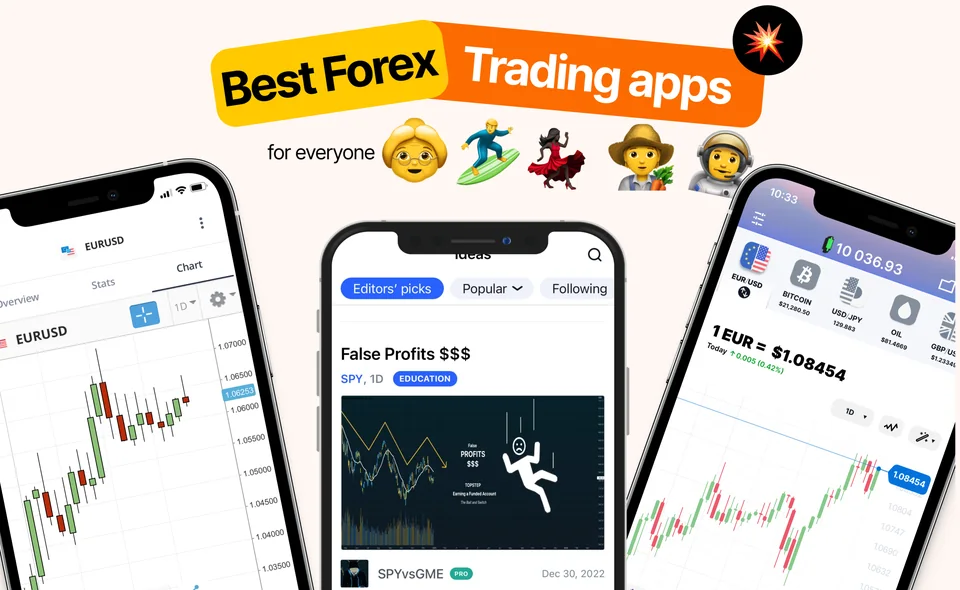
Earlier TradingView app screens. Prices and headlines are historical. The first panel credits Jimmy Chin for the photograph.
Which of these four forex apps should you start with?
These four apps do four different jobs. One teaches, one draws charts, and two let you trade with real money.
Four forex apps compared (checked 19 October 2026)
App
Main job
Real money?
Where
Main cost
eToro
Copy other investors
Yes
Forex in the UK, EU and Australia; no forex in the US; not in Canada
Spread and
GoForex (ours)
Learn and practise
No, virtual money
iPhone and Android, where your app store offers it
Free download; optional in-app purchases
Plus500
Trade CFDs (futures in the US)
Yes
UK, EU, Australia, Canada (not Quebec; in Alberta, accredited investors only); futures in the US
Spread and overnight funding
TradingView
Charts and
Only through a linked broker
Check local access
Free plan; paid plans
If you are new, start with an app that uses pretend money: a lesson app, TradingView's free paper trading, eToro's virtual portfolio or the Plus500 demo.
Check the Where column first. An app you can't use in your country is not an option, however good it looks.
Move to real money only when you can explain three things. What does the trade cost? How does work? How much could you lose on a bad day?
Older app screenshots. Layouts and prices change over time.
How much can you lose with leverage on a CFD app?
eToro and Plus500 offer forex as CFDs in the UK, the EU and Australia. A CFD pays you the change in price. You never own the currency. CFDs use leverage: a small deposit controls a much bigger trade.
As of October 2026, rules in the UK, the EU and Australia cap leverage for normal customers at 30:1 on major currency pairs and 20:1 on other pairs. The Australian rule runs until May 2027 unless ASIC, its regulator, renews it. In the US, forex dealers may offer up to 50:1 on major pairs. Plus500's US company offers currency futures, which also use .
Try it yourself below. Watch how the same small move gets bigger as you add leverage.
Try it yourself
Turn up the leverage
Set leverage to 30:1 and press the button to move the price 1% against you. Then try 50:1 and compare the loss.
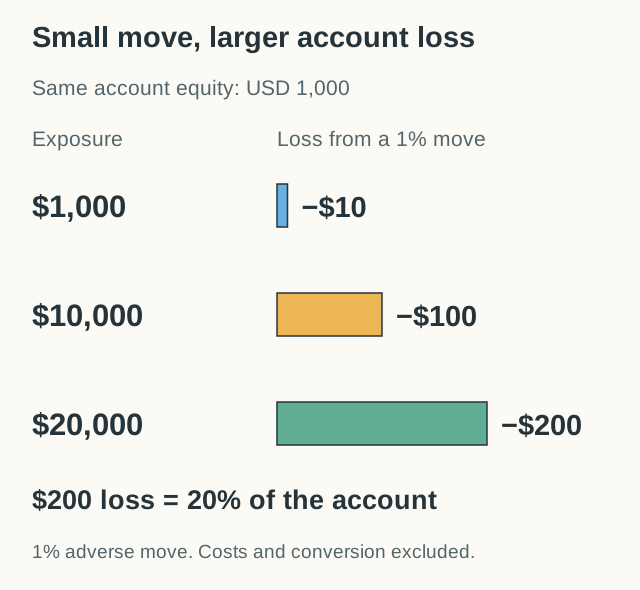
With $1,000 at 30:1 you control $30,000, so a 1% move against you loses $300, or 30% of your deposit. At 50:1 you control $50,000 and the same move loses $500, half your deposit. At 1:1 it loses only $10.
What would you expect?
What this shows: At 30:1, a 1% move against you costs 30% of your deposit, before fees. At 50:1, the same move costs half.
Leverage multiplies the price move. The price barely moved, but your loss is 30 or 50 times bigger. That is why the UK, EU and Australia cap major pairs at 30:1 for retail clients. Your broker may close the trade even sooner.
Can you start trading forex with $100?
Some brokers let you open an account with $100 or less. But a small account makes everything harder.
The smallest common trade size is a : 1,000 units of the first currency. On EUR/USD, one is then worth about 10 cents. A 10-pip move makes or loses about $1.
Many teachers say you should risk only 1% to 2% of your account on one trade. With $100, that is $1 or $2. So your stop-loss can only be 10 to 20 pips away. Normal price wiggles can hit that in minutes.
Small accounts also feel stressful. When one loss of $20 is a fifth of your money, it is hard to stay calm and follow your plan.
A better order: learn the basics, practise with pretend money, and keep a journal. Only then add real money that you can afford to lose. Our pip value lesson shows how to work out the money behind each pip.
What does each app cost?
"No commission" does not mean free. Here is what you pay with each app, as of October 2026.
eToro: you pay the spread on each trade and overnight fees on CFDs you keep open. Taking money out of a USD account costs $5, and conversion fees depend on your account. Copying has no extra fee.
GoForex: free to download. Its US Apple listing also shows ads and optional in-app purchases, so check the price before you accept an upgrade.
Plus500: no commission, but you pay the spread and overnight funding. If a trade is priced in another currency, a fee of up to 0.7% of its profit or loss applies. If you don't log in for 3 months, it can charge up to $10 a month. Its US futures have a different fee schedule: a commission per contract, plus exchange and regulatory fees.
TradingView: the free plan has paper trading. Paid plans (Essential, Plus, Premium and Ultimate) add more charts and indicators. On 19 October 2026 they started at $12.95 a month, paid yearly. If you link a broker, that broker charges its own trading costs.
Overnight fees matter most if you hold trades for days or weeks. Add them up before you compare apps. Our spread lesson explains the cost you pay on every single trade.
Which forex apps should you avoid?
For every real trading app, there are fake ones trying to take your money. Walk away if you see any of these signs:
Promised profits: nobody can promise you a return in forex.
No licence where you live: check the company on your own regulator's website.
Pressure to deposit: calls or messages that push you to add money fast.
Problems taking money out: read what other customers say about withdrawals.
Huge leverage: offers like 500:1 usually come from offshore companies outside the rules for your country.
Copycat apps: download only from a link on the company's official website.
A real licence does not protect you from trading losses. It means a regulator checks the firm and you have somewhere to complain if things go wrong.
Our guide to forex scams shows real examples of these tricks.
How can you compare these apps in four steps?
Try this plan over four short sessions. Use pretend money the whole time.
Explain. Pick one pair, such as EUR/USD. Write what the price means and what makes it go up.
Look. Open a chart and write one thing you notice, with the date and the time frame.
Practise. Place one practice trade with a stop-loss. Write the size, the reason and the result.
Review. Add up the costs you paid or skipped. Write one thing you will do differently.
Include what went wrong. If an order did not fill, or you could not find a cost, write that down too. A good comparison shows the weak spots, not just the nice screens.
For a wider list, including Bloomberg, OANDA and FOREX.com, read our best forex trading apps.
Add an order-status check to the practice sessions. A lost connection does not show whether the first order exists, so inspect its history before sending another.
How we chose
We compare four apps that do different jobs: eToro, GoForex, Plus500 and TradingView. So we compare what each one is for instead of giving scores.
They are listed from A to Z. We make GoForex, so we are not neutral about it. We give it the same kind of pros and cons as the others, and we say clearly that it can't place real trades.
The facts come from each company's official pages and regulator records. We checked them on 17 and 19 October 2026. We did not open live accounts, so we don't rate trade execution or customer support.
Start with an app that uses pretend money, such as a lesson app, TradingView paper trading or a broker's demo. Move to real money only when you can explain the spread, the overnight fee and how much you could lose on a bad day.
Is Plus500 available in the US?
As of October 2026, not for CFDs. Plus500's US company offers currency futures instead. It is registered with the CFTC and is a member of the NFA. Futures have contract sizes and expiry dates, so learn how they work before you trade them.
Can I trade forex on eToro from the US?
Not as of October 2026. eToro started rolling out copy trading in the US in October 2025, for stocks, ETFs and crypto only. US users can't trade forex or CFDs on eToro.
Is TradingView a broker?
No. TradingView is a charting platform. Its paper trading is free and uses pretend money. To trade for real, you link an account at a supported broker, which holds your money and sets your costs.
Why does leverage matter so much?
Leverage multiplies your result. At 30:1, a 1% move against you costs 30% of your deposit. As of October 2026, the UK, EU and Australia cap major currency pairs at 30:1 for retail clients. The US cap is 50:1.
Compare 8 brokers and apps for forex in the US, Canada, UK, EU and Australia: who each one suits, real costs, regulators and risks, plus a shortlist tool.
6 min readTry it: Find brokers that fit your country
Learn the difference between margin and leverage in forex, why a 1% move can cost 30% of your money, and leverage limits in the US, UK, EU and Australia.
5 min readTry it: Raise the leverage, then move the price