

Crypto
Bitcoin Memes: 13 Funny Favorites and the Truth Behind the Jokes
13 funny Bitcoin memes and two viral crypto videos, from chart-checking to AI meme-coin hype, with the real lesson behind each joke.
Buying and selling crypto costs money even if the price stands still. Learn to read bid and ask prices, add up every fee, and choose between market and limit orders.
Every market shows two prices. The is the lowest price a seller will accept, so it is the price you pay to buy. The is the highest price a buyer will pay, so it is the price you get when you sell. The gap between them is the .
Here is a market for a made-up coin called DEMO, priced in US dollars.
| Buyers (bids) | Sellers (asks) |
|---|---|
| Best bid: $99 for 3 coins | Best ask: $101 for 2 coins |
| Next bid: $98 for 4 coins | Next ask: $102 for 4 coins |
The spread is $101 − $99 = $2 per coin. The amount on offer matters too: only 2 coins are for sale at $101.
Many apps also show a "last price". That is the price of the most recent trade. It tells you about the past, not the price you will get next. Our bid vs ask guide has more worked examples.
Try it yourself
Press Buy, then Sell now, without waiting for the price to move. Then slide how many round trips you make in a month.
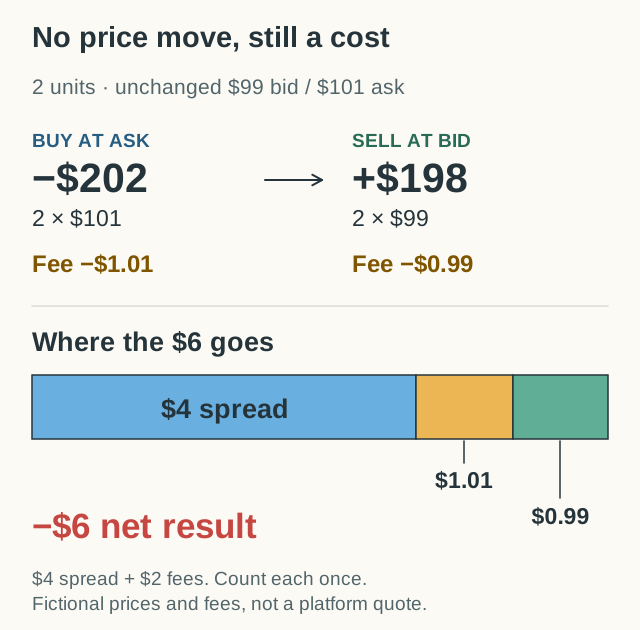
Buy 2 DEMO at the $101 ask and sell them at once at the $99 bid. You pay $202 and get back $198: a $4 loss before the price moves. At 20 round trips a month, the spread alone costs $80. A 0.5% fee on each side adds $2 per round trip.
What would you expect?
What this shows: You lost $4 the moment you bought and sold, before the price moved at all. At 20 round trips a month, that is $80.
You buy at the higher ask and sell at the lower bid, so you pay the $2 spread on each of your 2 coins. Fees come on top: with a 0.5% fee on each side, the same round trip costs $6.
A means buying and then selling the same coins. Let's buy 2 DEMO and sell them straight away, with no price change. This made-up app charges a 0.5% fee on each trade.
| Step | Sum | Amount |
|---|---|---|
| Buy 2 at the ask | 2 × $101 | −$202.00 |
| Buying fee | 0.5% × $202 | −$1.01 |
| Sell 2 at the bid | 2 × $99 | +$198.00 |
| Selling fee | 0.5% × $198 | −$0.99 |
| Result | $198 − $0.99 − $202 − $1.01 | −$6.00 |
You lose $6, even though the price did not move. $4 comes from the spread and $2 from fees. Don't take off the spread a second time: it is already inside the buy and sell prices.
If the app also charged $3 to withdraw your cash, you would be down $9. These fees are invented for the example. Real fees differ by app and by country.
Fixed fees hurt small trades the most. A $1 fee is only 0.1% of a $1,000 trade, but it is 10% of a $10 trade.
A says "fill this now, at the best prices available". A says "fill this only at my price or better".
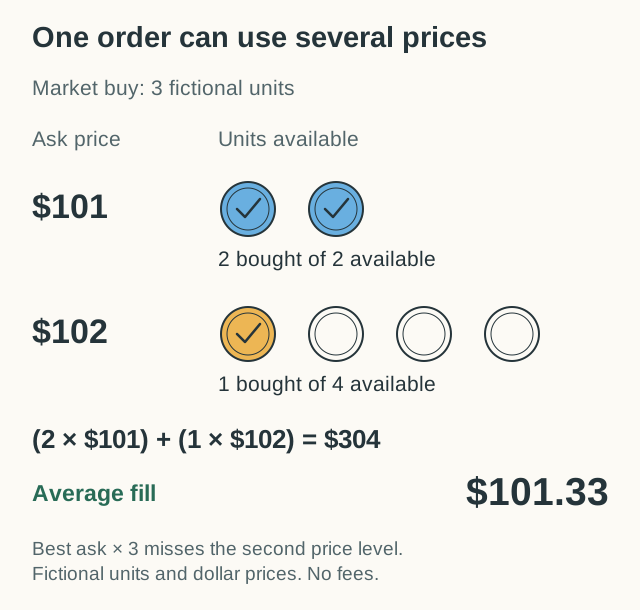
Say you place a market order to buy 3 DEMO. Only 2 coins are on offer at $101, so the third one comes from the next seller at $102. You pay $304 in total, or about $101.33 per coin. That is more than 3 × $101 = $303. Live prices can also move while your order goes through.
A limit order to buy at $100 would not buy from these sellers, because they all want more. Your order might wait and never fill. A limit order to buy at $102 could fill at once. So "limit" does not always mean "wait".
A limit order can also fill in part. If you ask for 5 coins and only 2 are offered at your price, you may get 2 now and the rest later, or never.
Each app has its own rules. For example, some exchanges warn in their help pages that a market order can fill at several prices. Learn the general rules in market, limit and stop orders.
Trading fees are only part of the bill. Before you compare apps, make a list with one line for each cost:
A platform's withdrawal charge and the network fee are not always the same thing. Write "not needed" or "unknown" where you can't tell. Check what the order preview really includes before you add costs together.
Some exchanges charge two levels of trading fee. If your order fills at once, you are a : you take an offer that was already waiting. If your order waits until someone trades with it, you are a . On some large exchanges, market orders always pay the taker fee. Fees can also depend on how much you trade.
We don't quote any app's rates here, because they change. Check the app's own fee page for your country, and keep US and Canadian dollars separate.
Try this one before you read the answer. You buy 1 made-up coin at $51 and sell it at $49. Each trade has a $0.25 fee. How much do you lose?
Next, see why a big fall needs an even bigger gain to recover in volatility and drawdowns. Keep these costs in mind: they make every recovery a little harder.
You bought at the ask but can only sell at the lower bid, and fees came off both trades. In our example, buying and selling 2 coins at once loses $6 without any price change: $4 of spread and $2 of fees.
Not always. A limit order controls the price you accept, and on some exchanges a waiting order pays a lower maker fee. But it may never fill, and a limit order that fills at once still pays the spread.
Not always. A network fee pays for moving crypto on its network. A platform may also charge its own withdrawal fee, or include the network fee in it. Check what the preview shows before you confirm.
It is the price of the most recent trade. It tells you what someone paid a moment ago, not what you will pay or get next. Look at the bid and the ask instead.
13 funny Bitcoin memes and two viral crypto videos, from chart-checking to AI meme-coin hype, with the real lesson behind each joke.
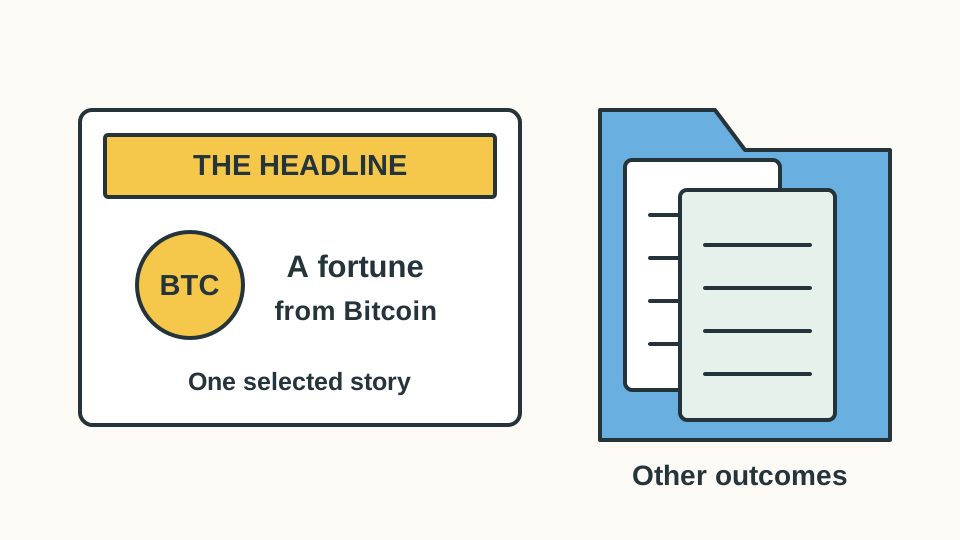
Bitcoin millionaire stories, from 5,000 forgotten coins to a $1,000 bet in 2011, and what the headlines leave out: timing, paper wealth and the losers.